
12Play login needs two things: the username you chose at sign-up and your password. Both go into the Login form at the top of the site. The same details open the website and the installed app, because one player holds one account and one main wallet behind every product.
Below are the sign-in route, the registration form, what to do when sign-in fails, and the account rules that later decide whether a withdrawal is released.
Signing in with your username and password
The route is short, and nothing else is needed at the point of sign-in.
- Press Login at the top right of the page.
- Type your Username, the name you created at registration.
- Enter your password and confirm.
The first field needs care. Registration collects a contact number and an email address, yet the sign-in form asks for the username, not either of those. If you cannot recall it, do not register again: a second account breaks the one-account rule.
One login for casino, sports and 4D
There is no separate 12Play casino login and no separate sports sign-in. Malaysia accounts run in MYR, so 12Play Malaysia login uses that single username and password. The same session carries you from live tables to the sportsbook, arcade and 4D. In short, everything the lobby holds sits behind that one sign-in.
Sign-in uses the username and password from your registration form, and one session covers the casino, the sportsbook and 4D.
12Play register: opening an account
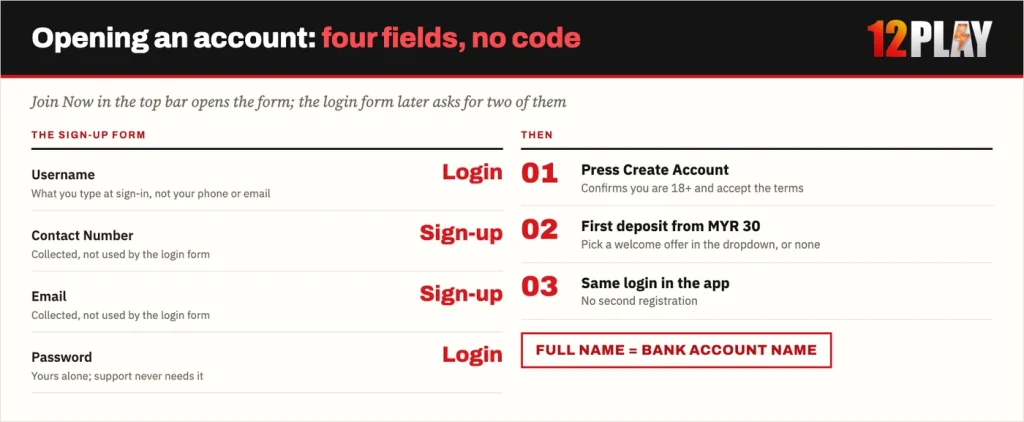
The sign-up form is short, but two choices made here follow you for as long as the account exists: the username and the name you register under.
The four sign-up fields
The form has four fields: Username, Contact Number, Email and Password. Pressing Create Account confirms that you are over 18 and accept the operator’s terms, so no separate tick-box follows. Choose a username you will remember without a note, because it is the only thing the login form asks for later.
- Open Join Now. The button sits beside Login at the top of the site.
- Fill the four fields. Username, Contact Number, Email and Password.
- Press Create Account. This confirms you are over 18 and accept the terms.
- Make the first deposit. Deposit bonuses start from MYR 30, and the offer is selected in the promotion dropdown while you deposit.
Before you continue
Register with the same full name that appears on your bank account. Deposits and withdrawals only succeed when the two match.
Picking a welcome offer on the first deposit
The promotion dropdown matters because the choice is made once. A first deposit can take the 100% welcome, the slots welcome or the sports and esports welcome. Each has its own cap and its own betting requirement. So compare the turnover behind which welcome offer to pick before you reach the cashier.
When sign-in fails
Two routes exist for account trouble. The login form has a Forgot Password link, and Live Chat handles everything else.
12Play forgot password and live chat
12Play Live Chat covers a forgotten username, a locked account or a changed phone number. The chat button sits on every page of the site and in the bottom bar on mobile, and it runs 24 hours a day.
| Problem | What to do |
|---|---|
| Forgotten password | Open Forgot Password on the login form. If that does not get you back in, raise it in Live Chat. |
| Forgotten username | Ask Live Chat. Do not register a second time, because duplicate accounts are suspended. |
| Account locked or suspended | Contact Live Chat from the button on the site or the bottom bar on mobile. |
| Sign-in works on the website but not in the app | Sign in on the website first to confirm the password, then reopen the installed app, which uses the same account. |
| A page reached from a chat message or an advert asks for your login | Do not enter anything. Close it, open the site from your own bookmark and sign in there. |
Quick checks before you ask
Before you escalate, run the ordinary checks that apply to any login form. Caps lock changes a password. Autofill often stores an old one. And a username typed on a phone keyboard can pick up a stray space at the end.
Signing in safely
Save your own bookmark to the site you registered on, and open the account from it every time. A sign-in page reached from a chat message, a forwarded link or an advert is the moment to stop and type nothing. A login form is cheap to copy, and your username and password are the whole key to the wallet.
Support never needs your password. A chat agent can work on an account question without it, so a request for the password itself is a reason to end the conversation.
That caution is practical. You are responsible for keeping your login details confidential, and transactions placed under your username are treated as yours. A bet also cannot be cancelled or changed once confirmed. As a result, a session someone else opens on your account cannot be unwound afterwards.
Account rules that decide your first withdrawal
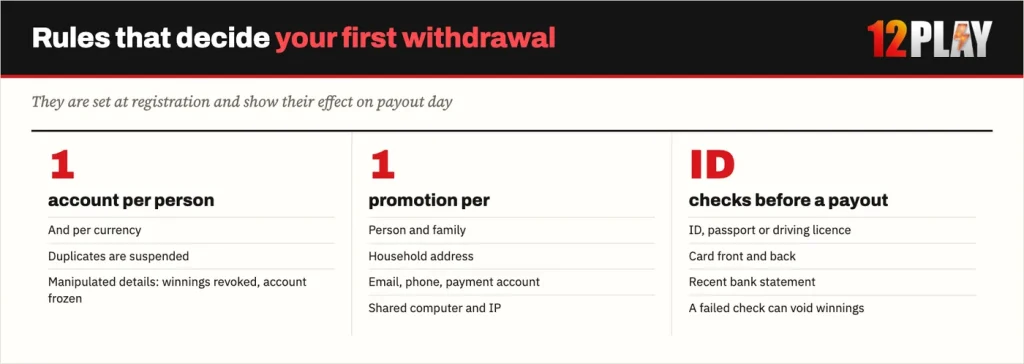
Three rules set at registration decide whether a withdrawal is released.
One account per person
One account is allowed per person and per currency, and duplicate accounts are suspended. Duplicates made with manipulated personal details can be terminated outright, with winnings revoked and the account frozen permanently. Promotions count once per person, family, household address, email, phone number, payment account and shared IP. Two accounts in one home therefore do not double any offer.
The bank name must match
The bank account holder name has to be identical to your registered name for deposits and withdrawals to go through. That is why the note above belongs before your first transfer, not after it.
Identity checks before a withdrawal
Before releasing a withdrawal, the operator can ask for proof of identity: an ID, passport or driving licence, the front and back of a card, or a recent bank statement. Random security checks happen too, and failing a security request can void winnings. Keeping a clear photo of your ID and a current statement to hand makes that request quick to answer.
Logging in on the 12Play app
The app is the same account, not a second one. It comes as a progressive web app rather than a store listing, so you add it from the operator’s own download page. On Android, scan the QR code shown there. On iPhone, open the site in Safari, tap the share button and choose Add to Home Screen.
In general terms, a progressive web app is the site itself running in its own window. That is why your username and password carry straight across, with no separate app registration. After installation, the icon opens the login form you already know.
If the app refuses a password the website accepts, check the password first, not the installation. Android and iPhone install the app in different ways, so follow the route for your phone.
FAQ
How do I log in to 12Play?
Press Login at the top of the site, type the username you chose at registration, enter your password and confirm. The same username and password work on the website and in the installed app, because one player holds one account.
I forgot my password. What can I do?
Use the Forgot Password link on the login form. If that does not get you back in, Live Chat is the published route for account and login problems and runs 24 hours a day.
Can I log in with my phone number instead?
No. The contact number is collected during registration, but the sign-in form asks for your username and password. If you cannot recall the username, raise it in Live Chat rather than creating a second account.
Can I open a second account?
One account is allowed per person and per currency. Duplicate accounts are suspended, and duplicates built on manipulated personal details can be terminated with winnings revoked and the account frozen permanently. Promotions also count once per person, household address, email, phone number, payment account and shared IP.
Why was my 12Play withdrawal held for documents?
Before releasing a withdrawal the operator can ask for proof of identity such as an ID, passport or driving licence, the front and back of a card, or a recent bank statement. Random security checks also happen. Failing to satisfy a security request can void winnings, and the bank account holder name has to match your registered account name.